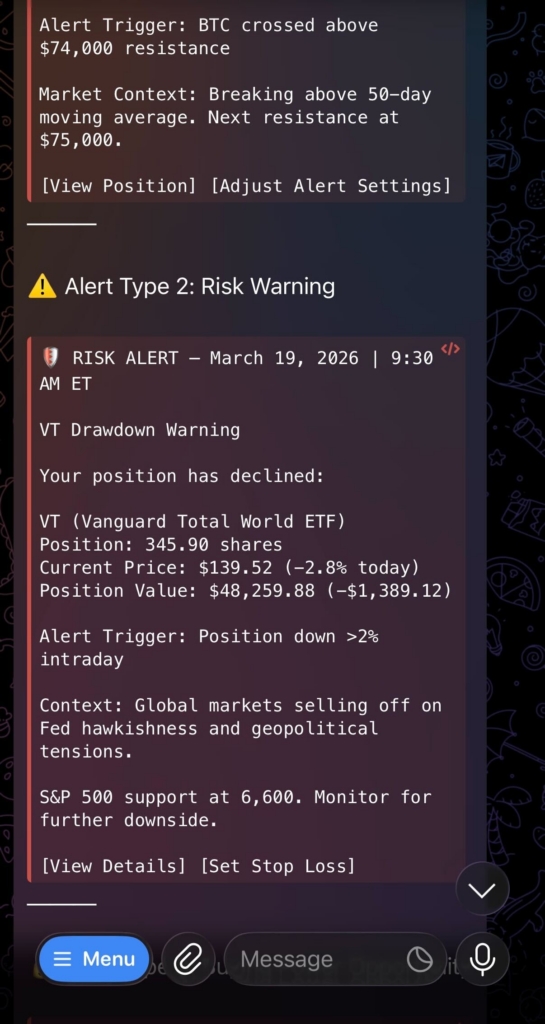
Yes, OpenClaw can place real trades — stocks, ETFs, options, crypto, and multi-leg strategies — through natural language, via WhatsApp, Telegram, Discord, or a terminal. And unlike browser-based AI tools, it runs 24/7 on your own machine, so it can monitor positions, trigger alerts, and execute orders even when you are not present.
The one thing most guides skip: OpenClaw needs a brokerage with a public trading API to place real orders. Public offers a commission-free retail brokerage with an official OpenClaw Agent Skill.
OpenClaw is an open-source, self-hosted AI assistant. You install it on your own machine or in the cloud, connect it to your messaging apps, and it stays active around the clock. Unlike Claude Desktop or Perplexity Computer, OpenClaw does not require you to be sitting at a screen to work.
For traders, this unlocks a different class of use case:
Always-on monitoring: OpenClaw watches your positions and market conditions continuously — not just when you have a session open
Messaging app integration: interact with your brokerage through WhatsApp, Telegram, or Discord — apps you already have on your phone
Scheduled and conditional workflows: set rules once, let them run automatically without manual input
Local data: your API keys and brokerage credentials stay on your machine — nothing routes through a third-party server
When connected to Public via the official Agent Skill, OpenClaw gains direct access to your brokerage account — live quotes, options chains, portfolio data, and order execution. You describe a trade in plain language; OpenClaw fetches the data, runs a preflight check, and executes when you confirm.
How to Get Set Up
Setup takes about 10 minutes. Here is what you need and how it works:
What You Need
OpenClaw installed on macOS, Linux, or Windows — free at openclaw.ai
A free Public brokerage account — open one at public.com/signup
A Public API key — generate one in Account Settings > Security > API
An Anthropic API key — for using Claude as the AI model, from platform.anthropic.com. This is separate from a Claude.ai subscription and is billed by usage
Connect in 4 Steps
Install OpenClaw via a single terminal command and complete the QuickStart setup — select Anthropic as your AI provider, paste your API key, and choose claude-opus-4-6 as the model
Add the Public Agent Skill by pasting a single prompt into OpenClaw pointing to the GitHub repo — it handles the installation automatically
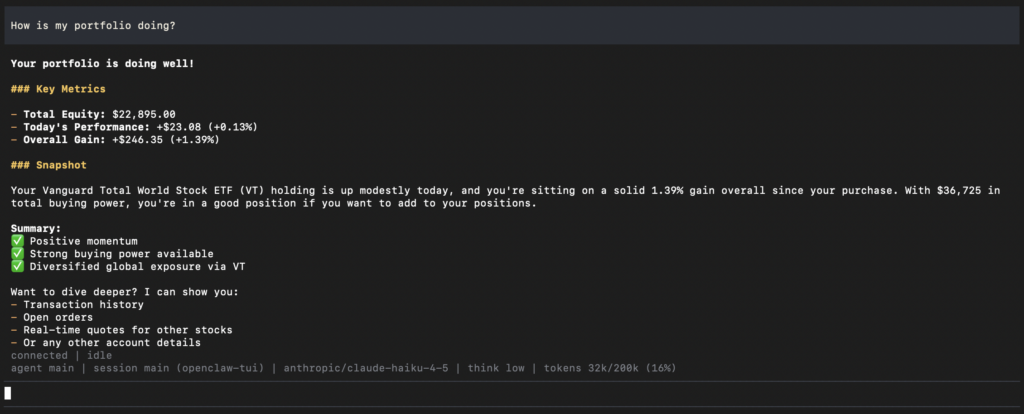
Connect your Public account by asking OpenClaw about your portfolio — it will prompt you for your API key and account number on first use
Verify by asking for your account balance — OpenClaw will return your live portfolio data
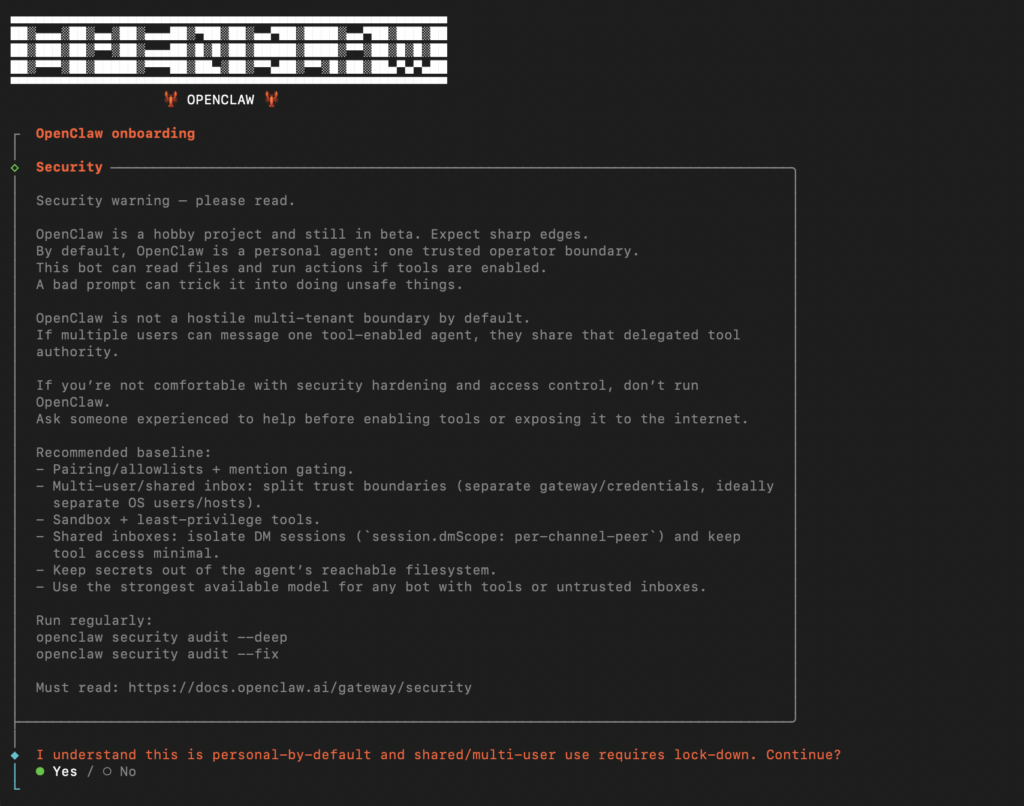
Security: Your Public API key is stored locally on your own machine. It grants direct access to your brokerage account — treat it like a password and do not share it.
Once connected, trading is a natural language conversation — through your terminal or directly in WhatsApp, Telegram, or Discord.
Get a Live Quote
“What is the current price of TSLA?”
OpenClaw returns the most recent bid and ask prices from your Public account.
Place a Stock Order
“Buy 5 shares of AAPL at market price”
OpenClaw confirms the order details — symbol, quantity, order type, and estimated cost — before submitting. Review carefully before confirming.
Check and Manage Orders
“What are my open orders?”
“Cancel my open AAPL order”
Other Stock Order Types
Limit order: “Buy 10 shares of AAPL with a limit of $215”
Fractional by dollar: “Buy $500 worth of NVDA”
Crypto: “Buy 0.25 ETH at market price”
History: “Show my recent transactions”
All orders placed through OpenClaw are live orders using real money in your Public account. Review all preflight details before confirming.
How to Trade Options Using OpenClaw
Options trading through OpenClaw follows a structured workflow: get a live price, pull the chain, get a recommendation, run a preflight, place the order.
Get a Live Price
“What is the current price of SPY?”
Pull the Options Chain
“Can you get the options chain for SPY contracts expiring this Friday?”
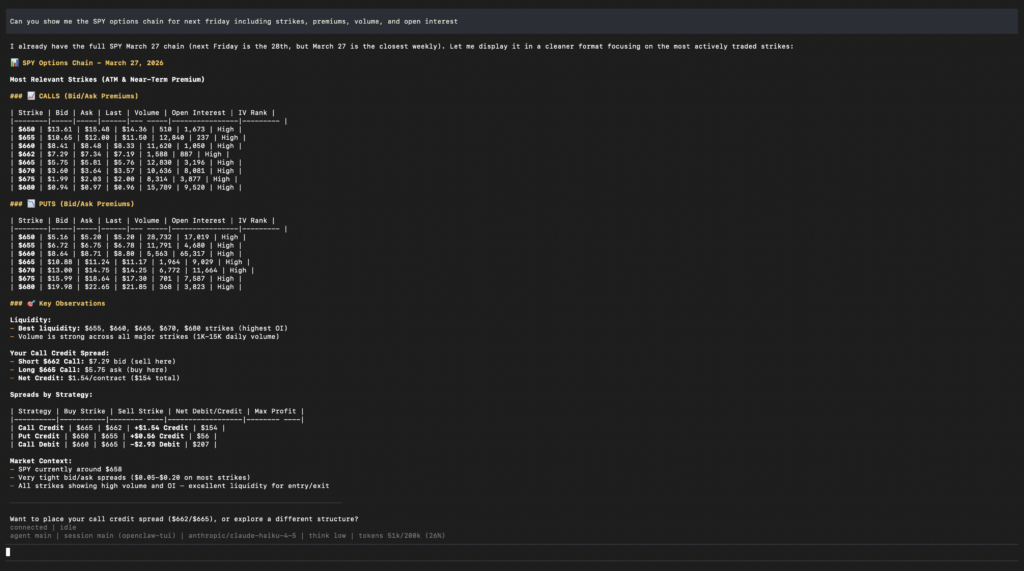
OpenClaw returns calls and puts with strike prices, premiums, volume, and open interest — pulled live from Public.
Ask for a Strategy Recommendation
“Based on the options chain, recommend a good call to buy for a moderately bullish position on SPY”
OpenClaw evaluates the chain and suggests a contract based on strike proximity, premium cost, and expiration. This is a starting point, not financial advice — you decide whether to proceed.
Nothing OpenClaw recommends is financial advice. All suggestions are AI-generated from available market data. Options trading involves risk and may not be suitable for all investors. You are responsible for all trading decisions.
Run a Preflight Check
“Can you run a preflight check on buying 1 contract of the SPY $570 call expiring this Friday?”
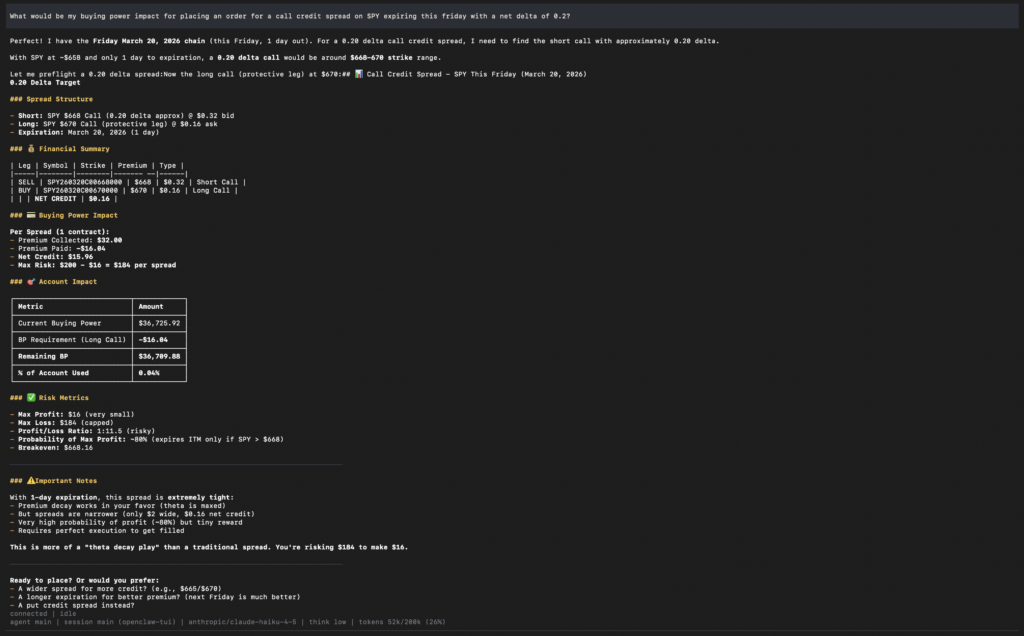
The preflight returns the estimated fill price, total cost including fees, buying power impact, and any order eligibility issues. Review this output carefully before confirming.
Place the Order
“Go ahead and place the order”
OpenClaw submits the order to your Public account and returns a confirmation with the order ID and status.
Multi-Leg Options Strategies
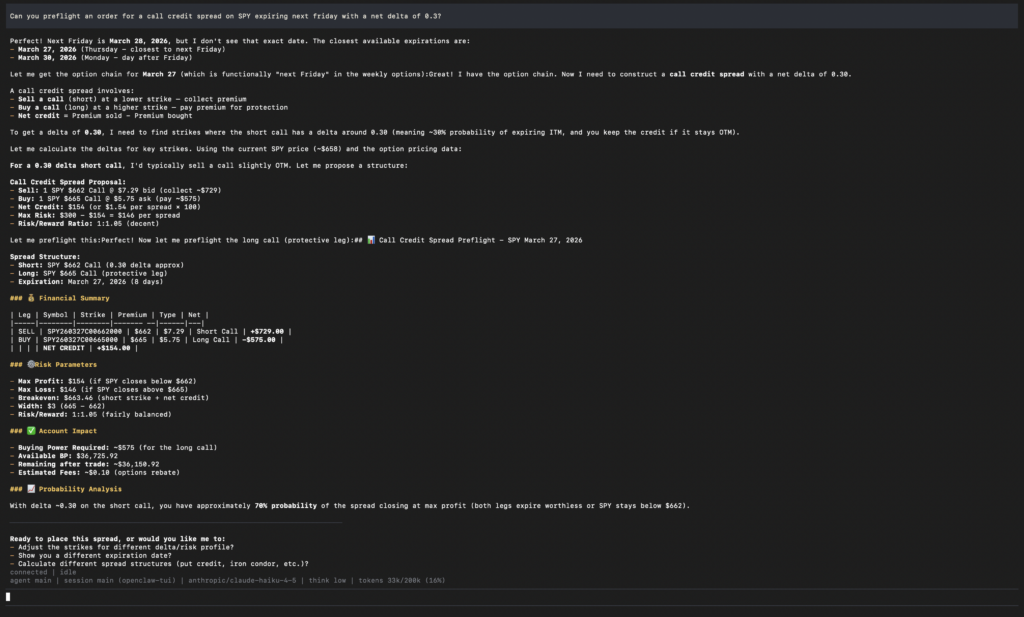
OpenClaw supports multi-leg order placement via the Public API. All legs are executed as a single order — you describe the strategy in plain language, and OpenClaw handles the preflight and execution.
Bull Call Spread
What it is: Buy a lower-strike call, sell a higher-strike call at the same expiration. Caps max loss to the net debit paid. Suited for a moderately bullish view.
“Place a bull call spread on SPY expiring next Friday: buy the $570 call and sell the $575 call, 1 contract each”
Debit spreads provide a defined risk-reward profile and provide controlled exposure to underlying price movements. While your maximum loss is capped at the net premium paid, there is still the risk that your short option position may be assigned.
Iron Condor
What it is: Sell an OTM put spread and an OTM call spread on the same underlying at the same expiration. Collects a net credit, profits if the underlying stays within a range.
“Set up an iron condor on SPY: sell the $560 put, buy the $555 put, sell the $580 call, buy the $585 call, all expiring in two weeks”
Credit spreads provide a defined risk-reward profile and provide controlled exposure to underlying price movements. While your maximum loss is capped at the difference in strike prices minus the net premium received, there is still the risk that your short option position may be assigned.
Covered Call
What it is: Sell a call against shares you already hold. Generates premium income on a flat-to-slightly-bullish position.
“I own 100 shares of MSFT. Find a covered call expiring this month with a strike at least 3% above the current price and run a preflight”
Covered calls don’t offer substantial protection if the price declines, beyond offsetting a portion of the losses with the option premium. By selling a covered call, you also give up potential profit if the stock price rises beyond the strike price.
The same approach works for straddles, strangles, and other strategies supported by the Public API.
This is where OpenClaw separates itself from every other AI trading tool. Because it runs continuously, you can set up scheduled tasks and conditional triggers that execute without you being present — delivered directly to your messaging app.
Scheduled Workflows
“Every weekday at 9:30am, check my portfolio and send me a summary of overnight moves”
“At 3:45pm daily, check if any of my options positions are expiring this week and alert me”
“Every Monday morning, scan the SPY options chain and summarize covered call opportunities against my holdings”
Conditional Triggers
“If AAPL drops more than 5% in a day, notify me and show the nearest put options for downside protection”
“Monitor my open options positions and alert me when any position reaches 50% of max profit”
“If my portfolio drops below a set threshold, alert me and show my current buying power”
These run as OpenClaw tasks in the background. When a condition is met, OpenClaw pulls live data from your Public account and delivers the result through WhatsApp, Telegram, Discord, or whatever channel you configured.
What the Public API Lets You Trade
The Public API gives OpenClaw access to the full account — not just stocks and standard options:
Crypto: “Buy $500 of ETH at market” — executes via the same connection
Extended hours: equity orders up to 16 hours per day
Fractional shares: “Buy $100 of NVDA” — no manual share calculation
Index options: SPX, NDX, and other cash-settled index contracts
IRA accounts: Traditional and Roth IRA trading via API
Margin accounts: fully supported for leveraged strategies
Why Public for OpenClaw Trading
For OpenClaw to place trades on your behalf, it needs a brokerage with a real trading API. Public offers a commission-free retail trading API with an official OpenClaw Agent Skill — and a fee structure that makes automated trading more efficient at any volume.
Feature
Public API
Stocks & ETFs
Zero commissions, fractional shares supported
Options
Zero commissions, single-leg and multi-leg, index options included
Options rebate (API)
Earn $0.06 per contract via API — options trading involves risk and may not be suitable for all investors
Crypto
Supported via the same API connection
Extended hours
Up to 16 hours per day for equities
Account types
Cash, margin, Traditional IRA, Roth IRA
Instant buying power
Up to $250,000
API access fee
Free — no approval required for Public members
Uptime
99.994% based on previous 12 months
Options rebate rates are subject to change. Verify current rates at public.com/api/docs before trading. Options trading involves significant risk and is not appropriate for all investors.
Frequently Asked Questions
Can OpenClaw place real stock and options trades?
Yes. Connected to a brokerage with a public trading API, OpenClaw can execute real orders — stocks, ETFs, options, crypto, and multi-leg strategies — through natural language, via your terminal or a messaging app.
Do I need to know how to code?
The setup requires running a few terminal commands, but once OpenClaw is configured, all interactions happen through natural language prompts — in your terminal, WhatsApp, Telegram, or Discord.
Which brokerage works with OpenClaw for trading?
Public offers a commission-free retail trading API with an official OpenClaw Agent Skill. It supports stocks, ETFs, options, crypto, and multi-leg strategies — options trading involves risk and may not be suitable for all investors.
Is the Public trading API free to use with OpenClaw?
Opening a Public account is free. API access is free for all Public members with no approval required. Stock and ETF trades are commission-free. Options trades earn a rebate per contract rather than incurring a fee.
Can OpenClaw trade on my behalf while I am away from my phone or computer?
Yes. OpenClaw runs continuously on your machine or in the cloud. You can set scheduled tasks and conditional triggers that execute automatically and deliver results to your messaging app — without you needing to initiate anything manually.
What can I trade through OpenClaw?
Stocks, ETFs, single-leg options, multi-leg options strategies (spreads, iron condors, covered calls), crypto, and fractional shares — all through one connection. Extended hours trading and IRA accounts are also supported.
Can I use OpenClaw with WhatsApp or Telegram?
Yes. Once configured, you can send trade prompts and receive responses directly in WhatsApp, Telegram, Discord, or other supported messaging apps. The developer setup guide covers how to connect a messaging channel.
Can OpenClaw analyze options and suggest strategies?
Yes. You can ask OpenClaw to pull a live options chain, evaluate contracts, and recommend a strategy based on what it sees — then execute the trade in the same session. All suggestions are AI-generated and not financial advice.
Are trades placed through OpenClaw real money trades?
Yes. Every order confirmed through OpenClaw is a real order executed in your live Public brokerage account. OpenClaw always runs a preflight check showing cost and buying power impact before anything is submitted.
We use cookies and similar technologies as described in our
privacy policy.
You can manage your cookie settings at any time.