Yes, Claude Desktop can place real trades: stocks, ETFs, options, crypto, and multi-leg strategies, through natural language, using Public’s official MCP server to connect directly to your brokerage account. The Model Context Protocol (MCP) is what makes this possible, and Public is one of the few retail brokerages that offers it commission-free for individual brokerage and IRA accounts.
This guide covers how to set it up and what you can do once it is running, from your first stock order to iron condors and covered calls.
Most AI tools work as research assistants — you ask a question, you get a text answer. Claude Desktop with the Public MCP server is different. It can take actions. You type a trade instruction, and Claude calls your brokerage API directly to execute it.
The setup runs locally on your Mac or PC. Your API key stays in a config file on your machine. The MCP server process runs on your machine. Your brokerage API calls go directly from your computer to Public — Anthropic’s servers are not in that data path for order execution.
With the Public MCP server connected, you can do all of the following from a single Claude Desktop conversation:
Pull live quotes, bid/ask spreads, and options chains
Place market, limit, stop, and stop-limit orders for stocks, ETFs, and options
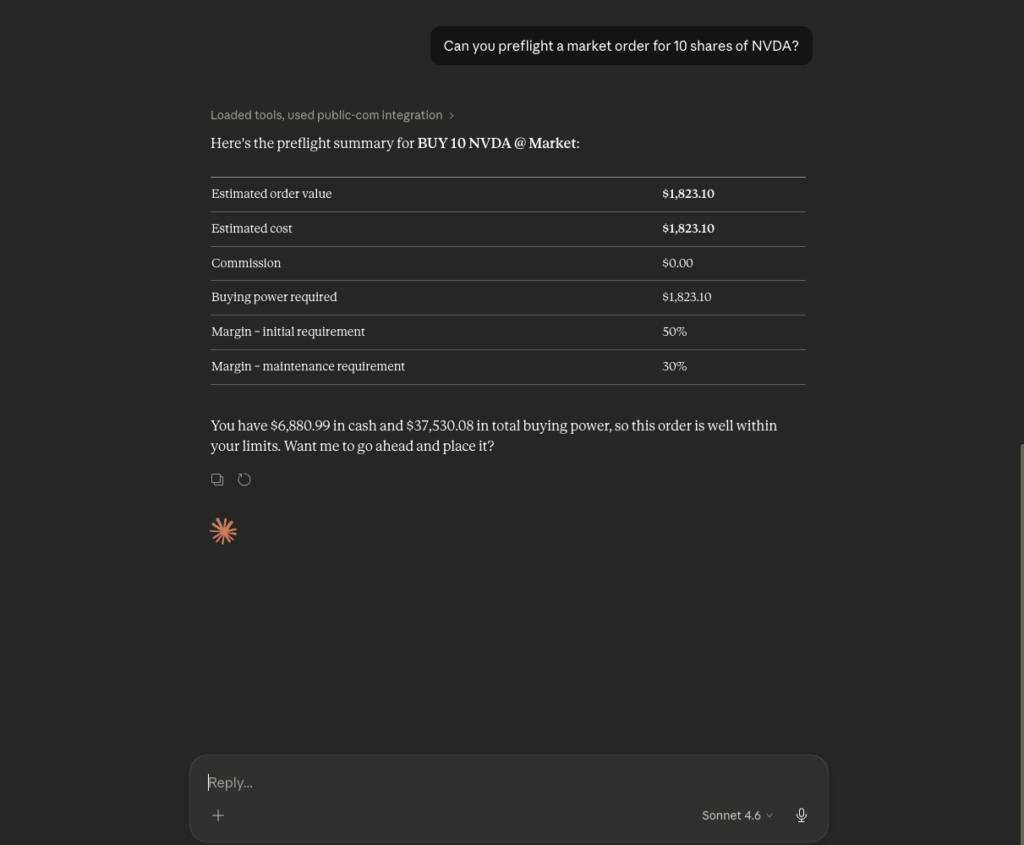
Run a preflight check before any order is submitted — showing cost and buying power impact
Place multi-leg options orders including vertical spreads, iron condors, and straddles as a single order
Review your portfolio, open positions, P&L, and order history
Place crypto orders through the same connection
Trade inside a Traditional or Roth IRA via API
Combine the Public MCP server with other MCP servers for research-to-execution workflows
Local data handling: Your PUBLIC_COM_SECRET and PUBLIC_COM_ACCOUNT_ID are stored in claude_desktop_config.json on your local machine. The MCP server reads those values locally and uses them to call the Public API directly. Your credentials do not pass through any third-party server between Claude Desktop and Public.
What is MCP and Why Does it Matter for Brokerage Access
MCP stands for Model Context Protocol. Anthropic introduced it as an open standard so that Claude can connect to external tools, APIs, and data sources in a structured way. Instead of Claude only generating text responses, MCP allows Claude to call functions exposed by an external server — in this case, your brokerage.
Here is what happens when you type a trade instruction into Claude Desktop after the MCP server is configured:
Claude Desktop starts the MCP server process at launch, using the settings in claude_desktop_config.json
The MCP server exposes brokerage functions to Claude: get_quote, place_order, get_options_chain, get_option_greeks, and others
You type an instruction such as “Buy 5 shares of AAPL at market price”
Claude identifies the correct function and calls it with the right parameters
The MCP server sends that call to Public’s API and returns the result to Claude
Claude shows you the result in plain text, including order status and fill details
How to Get Set Up
Setup takes about 5 minutes. Here is what you need and how it works:
What You Need
Claude Desktop for macOS or Windows — free at claude.ai/download. A paid Claude plan may be required to use MCP integrations
A free Public brokerage account — open one at public.com/signup
A Public API key — generate one in Account Settings > Security > API
Connect in 3 Steps
Install uv (a Python package manager) via Homebrew — the Public MCP server runs locally on your machine and needs it
Add the Public MCP server entry to Claude Desktop’s config file — a single JSON block with your API key and account ID
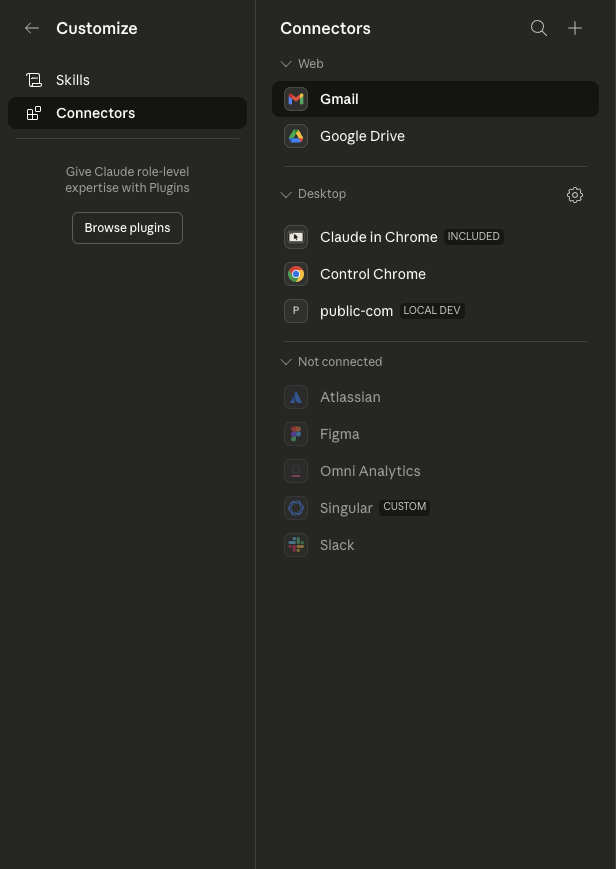
Restart Claude Desktop, open Connectors, confirm public-com is active, then verify by asking Claude for your account balance
Security: Your API key stays in a config file on your local machine. It is not sent to any third-party server — all brokerage calls go directly from your computer to Public.
Once the connection is verified, you can place orders by typing in plain English. The flow for a basic stock order: get a quote, check buying power, place the order.
Get a Live Quote
“What is the current bid, ask, and last price for AAPL?”
Check Your Buying Power
“What is my available buying power?”
Place a Market Order
“Buy 10 shares of AAPL at market price”
Claude runs a preflight check first — showing estimated fill cost, total buying power impact, and order type. After you confirm, Claude submits the order and returns the order ID, status, and fill price.
Other Order Types
Limit order: “Buy 10 shares of AAPL with a limit of $215”
Stop order: “Sell 5 shares of TSLA with a stop at $175”
Fractional by dollar: “Buy $500 worth of NVDA”
Crypto: “Buy 0.25 ETH at market price”
Cancel: “Cancel my open TSLA limit order”
History: “Show my recent transactions”
All orders are live. There is no paper trading mode. Every order you confirm through Claude Desktop is a real order placed in your live brokerage account. Review all preflight details before confirming.
Pull an Options Chain and Place a Single-Leg Order
Claude MCP options trading follows a step-by-step flow: pull the chain, review the contract, check the Greeks, run a preflight, place the order.
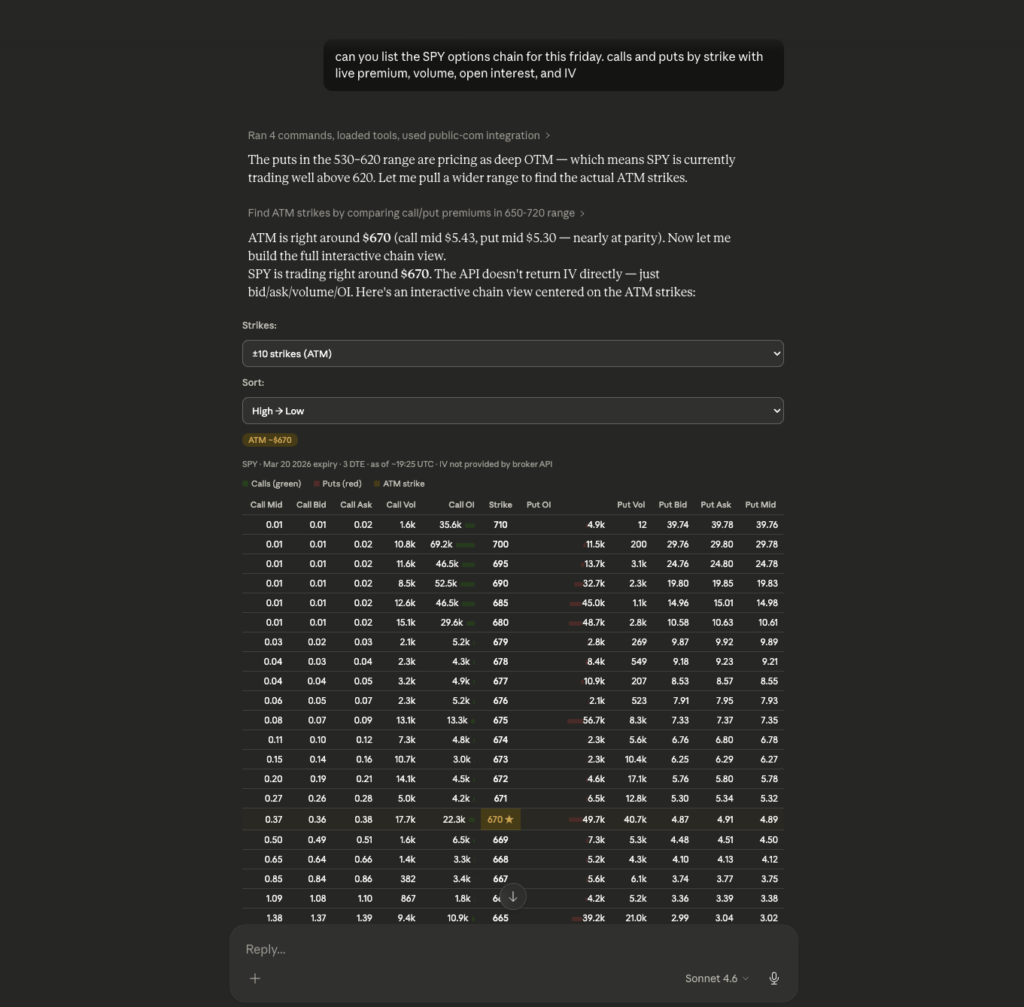
Pull the Options Chain
“Show me the options chain for SPY expiring this Friday”
Claude returns calls and puts sorted by strike price, with live premium, volume, open interest, and implied volatility for each contract.
Check the Greeks on a Specific Contract
“What are the delta, gamma, and theta for the SPY $560 call expiring this Friday?”
Claude returns live Greeks for that contract. You can follow up by asking what those values mean for a given price move in the underlying, which helps assess actual exposure before placing the trade.
Run a Preflight and Place the Order
“Run a preflight on buying 2 SPY call contracts at the $560 strike expiring this Friday”
The preflight shows total premium, per-contract cost, buying power impact, and maximum loss before any order is submitted. Once you confirm, Claude places the order and returns fill details.
Other Single-Leg Options Prompts
“Show the put chain for QQQ expiring in two weeks”
“What is the implied volatility for the AAPL $200 call expiring next Friday?”
“Buy 1 NVDA put at the $120 strike expiring next month, limit order at $3.50”
“Close my open SPY call position at market”
“Show me the Greeks for my current options positions”
Execute Multi-Leg Options Strategies
The Public trading API supports native multi-leg order placement. All legs of a strategy are submitted as one order. You can set up vertical spreads, iron condors, and covered calls through Claude Desktop with a single prompt.
Bull Call Spread
What it is: Buy a lower-strike call, sell a higher-strike call at the same expiration. Caps max loss at the net debit paid. Suited for a moderately bullish view.
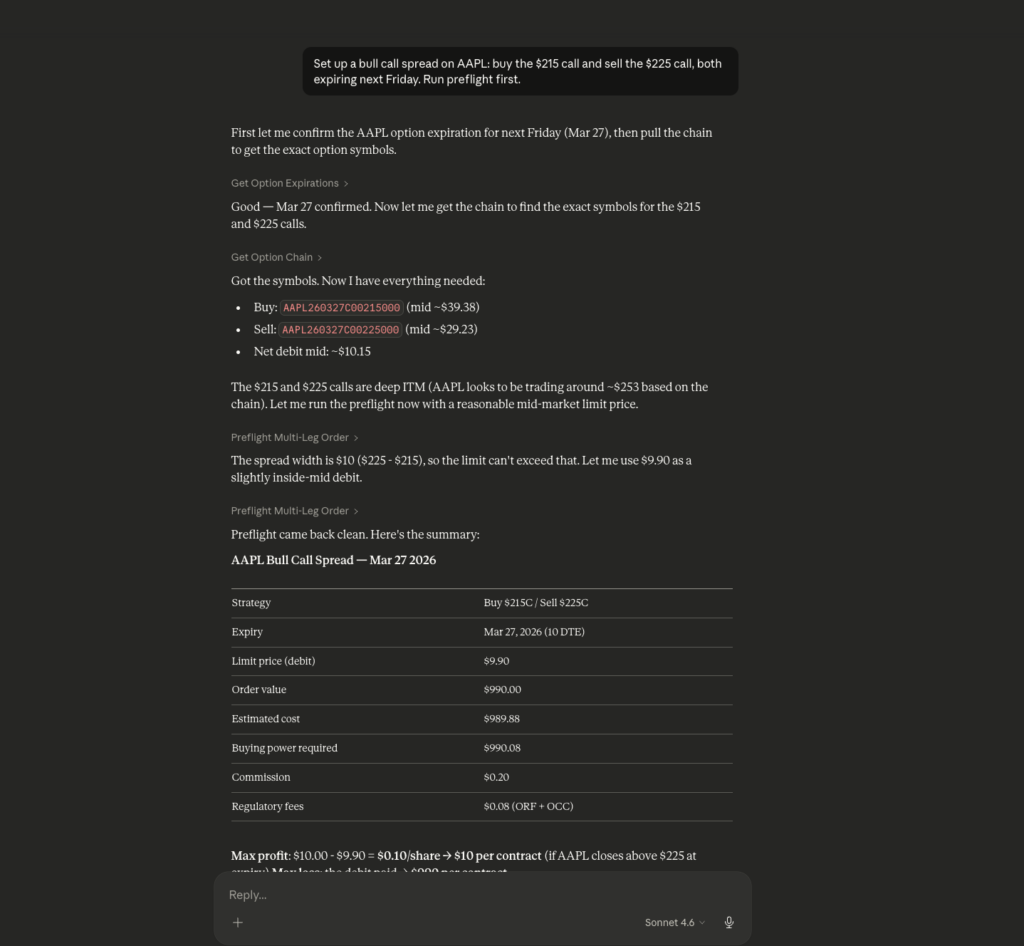
Example: AAPL is trading at $210. You buy the $215 call and sell the $225 call, both expiring next Friday.
“Set up a bull call spread on AAPL: buy the $215 call and sell the $225 call, both expiring next Friday. Run preflight first.”
The preflight shows net debit, maximum profit if AAPL closes above $225, maximum loss if AAPL closes below $215, and the breakeven price — all from live premium data.
Iron Condor
What it is: Sell an OTM put spread below the market and an OTM call spread above it. Collects a net credit, profits if the underlying stays within the range between short strikes through expiration.
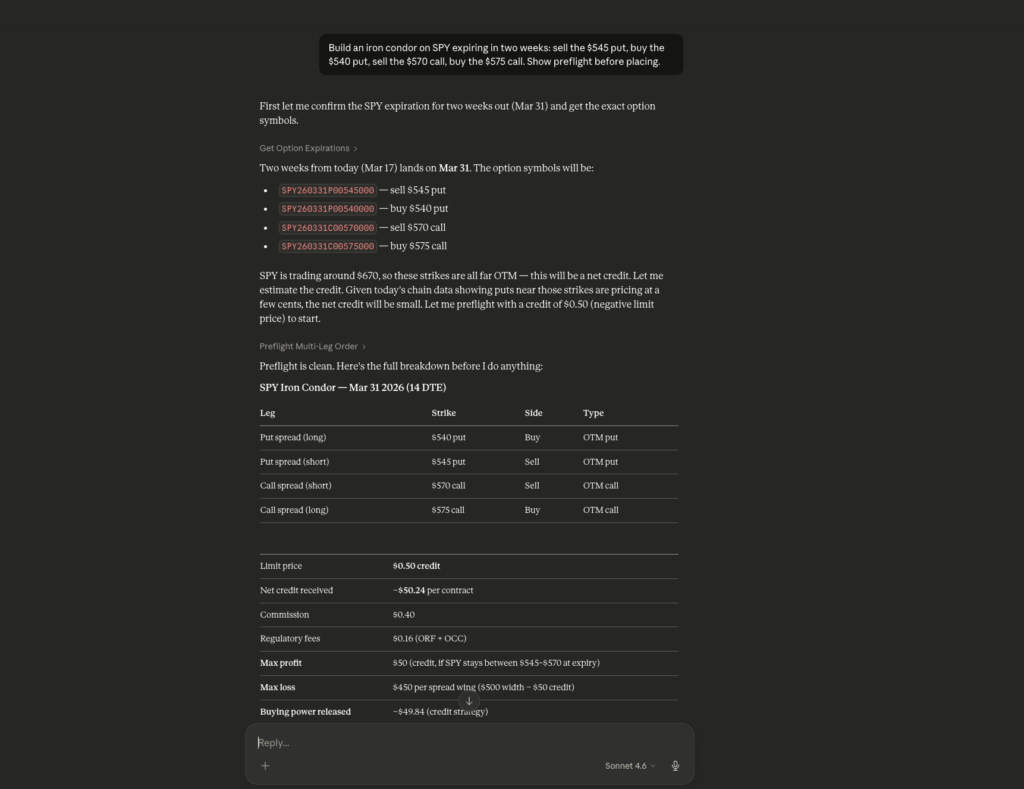
Example: SPY is trading at $557. You sell the $545 put, buy the $540 put, sell the $570 call, buy the $575 call — all expiring in two weeks.
“Build an iron condor on SPY expiring in two weeks: sell the $545 put, buy the $540 put, sell the $570 call, buy the $575 call. Show preflight before placing.”
The preflight shows net credit received, maximum loss on each side, the profitable range, and buying power required.
Covered Call
What it is: Sell a call against shares you already hold. Generates premium income on a flat-to-slightly-bullish position.
Example: You hold 100 shares of MSFT at an average cost of $420. You want to write a covered call at least 3% out of the money expiring this month.
“I own 100 shares of MSFT. Find a covered call expiring this month with a strike at least 3% above the current price. Show me the premium and run a preflight.”
Claude checks your MSFT position, identifies the appropriate strike based on current price, shows you the net credit and the price at which your shares would be called away, and runs the preflight before placing.
What Else You Can Trade via Claude Desktop
The Public API covers the full account — not just stocks and standard options:
Crypto: “Buy 0.25 ETH at market price” — executes via the same MCP connection
Extended hours trading: equity orders up to 16 hours per day — specify extended hours in your prompt
Fractional shares: “Buy $200 of NVDA” — no manual share calculation needed
Index options: SPX, NDX, and other cash-settled index contracts — use the index ticker in your prompt
IRA accounts: set PUBLIC_COM_ACCOUNT_ID to your IRA account ID. Add a second mcpServers entry for both taxable and IRA accounts
Margin accounts: fully supported for leveraged strategies via API
Why Commission-Free API and Options Rebates Matter for Active Traders
When you trade manually a few times a week, per-contract fees are easy to overlook. When you run workflows that place orders programmatically through Claude Desktop, those same fees apply to every single order. Over time, the difference between a commission-charging broker and one that charges zero compounds significantly.
Feature
Public
Typical Retail Broker
Stock & ETF commissions
Zero
$0–$4.95/trade
Options commissions
Zero
$0.65/contract
Options rebate (API trades)
$0.06–$0.18/contract
None
API access fee
Free
$0–$100/month
Multi-leg options via API
Yes
Varies
IRA accounts via API
Yes
Rare
Crypto via same API
Yes
Usually separate
Instant buying power
Up to $250,000
T+2 typical
Claude Desktop MCP server
Official, maintained
Not available
Why Public is the preferred Brokerage for Claude Trading Bot
If you are going to automate your trading, the brokerage you choose matters more than it does for manual trading. Commissions compound. Latency matters. Uptime is non-negotiable.
Zero commissions on all API trades — stocks, ETFs, and options
Options rebates: earn $0.06–$0.18 per contract traded. At scale, this is significant income that no other commission-free broker offers
Instant buying power up to $250,000 — no waiting for funds to settle on time-sensitive bot trades
99.994% uptime over the past 12 months
Full multi-asset API: stocks, ETFs, options, index options, crypto in one integration
IRA and margin support via API — rare among retail brokerage
Official agent skills for Perplexity Computer, Claude Desktop, and OpenClaw — actively maintained
Frequently Asked Questions
Can Claude Desktop place real stock and options trades?
Yes. Claude Desktop can execute real orders across stocks, ETFs, options, crypto, and multi-leg strategies through natural language via Public.com’s trading API. No coding required, and no commissions on trades placed through the API.
Which brokerage works with Claude Desktop for trading?
Public.com offers an official Claude Desktop MCP server with a commission-free trading API. It supports stocks, ETFs, options, crypto, and multi-leg strategies across individual brokerage and IRA accounts, with no coding required to get started.
What is a Claude trading bot?
A Claude trading bot uses Claude Desktop connected to Public.com’s trading API via MCP to execute automated trading workflows through natural language. You can set up scheduled tasks, conditional triggers, and multi-leg options strategies that run without manual input.
Can Claude Desktop analyze options and suggest strategies?
Yes. Connected to a brokerage with a public trading API, you can ask Claude to pull a live options chain, explain the Greeks for a specific contract, and recommend a strategy based on what it sees — then execute it in the same conversation.
What is an automated Claude trading workflow?
A Claude trading workflow connects Claude Desktop to Public.com’s trading API via MCP, enabling end-to-end sequences from live market data to order execution. Examples include earnings research to options trades on Public.com, covered call scanning, and scheduled portfolio monitoring.
Can Claude be used as a trading agent?
Yes. Connected to Public.com’s official MCP server, Claude Desktop acts as an AI trading agent with direct access to Public.com’s commission-free trading API, placing real orders across stocks, ETFs, options, and crypto through natural language.
We use cookies and similar technologies as described in our
privacy policy.
You can manage your cookie settings at any time.