Get Started
Perplexity Trading Agent: Getting Started with the Perplexity Agent Skill
Learn how to get started with the official Public Agent Skill for Perplexity Computer. We'll go through setup and placing your first option order.
What You'll Do
Add the Public Agent Skill to Perplexity Computer
Configure your Public API keys in Perplexity Computer
Retrieve portfolio data and place your first option trade
What is Perplexity Computer
Perplexity Computer is a cloud based AI system designed to function as a general purpose digital worker. Rather than simply answering questions, it creates and executes entire workflows, automating tasks that can run for hours or even months. It combines deep research, multi model orchestration, and advanced automation into a single system, with sub-agents handling everything from web research and document generation to data processing and app integrations.
This makes it a powerful tool for investing and trading applications. Its ability to run parallel research across multiple sources means it can simultaneously analyze earnings reports, monitor macroeconomic indicators, track news sentiment, and synthesize that data into actionable insights, all without manual input. Workflows can be scheduled or triggered by conditions, enabling continuous market monitoring rather than point-in-time snapshots.
Connecting your Public.com brokerage via an agent skill takes this further by closing the loop between research and execution. Rather than switching between tools, Perplexity Computer can pull live portfolio and account data to contextualize its analysis against your actual holdings, monitor positions and trigger alerts based on price movements or portfolio thresholds, and execute trades automatically when predefined conditions are met. The result is a fully integrated investment workflow, from data ingestion and analysis to order execution, orchestrated within a single system.
Before You Get Started
- →Set up a Perplexity account. You'll need the Perplexity Max subscription to use Perplexity Computer.
- →You will need a Public.com brokerage account. Create one at public.com/signup.
- →Once you create your Public brokerage account, you'll need a Public API key. Generate one by creating a new key and saving it.
Adding the Public Agent Skill to Perplexity Computer
First, download the Public Agent Skill by visiting the GitHub repository and downloading it as a ZIP file via Code → Download ZIP.
Once the skill zip file is downloaded, navigate to perplexity.ai/computer/skills and in the top right corner click on + Create skill → Upload a skill. Attach the zip file of the Public Agent Skill.
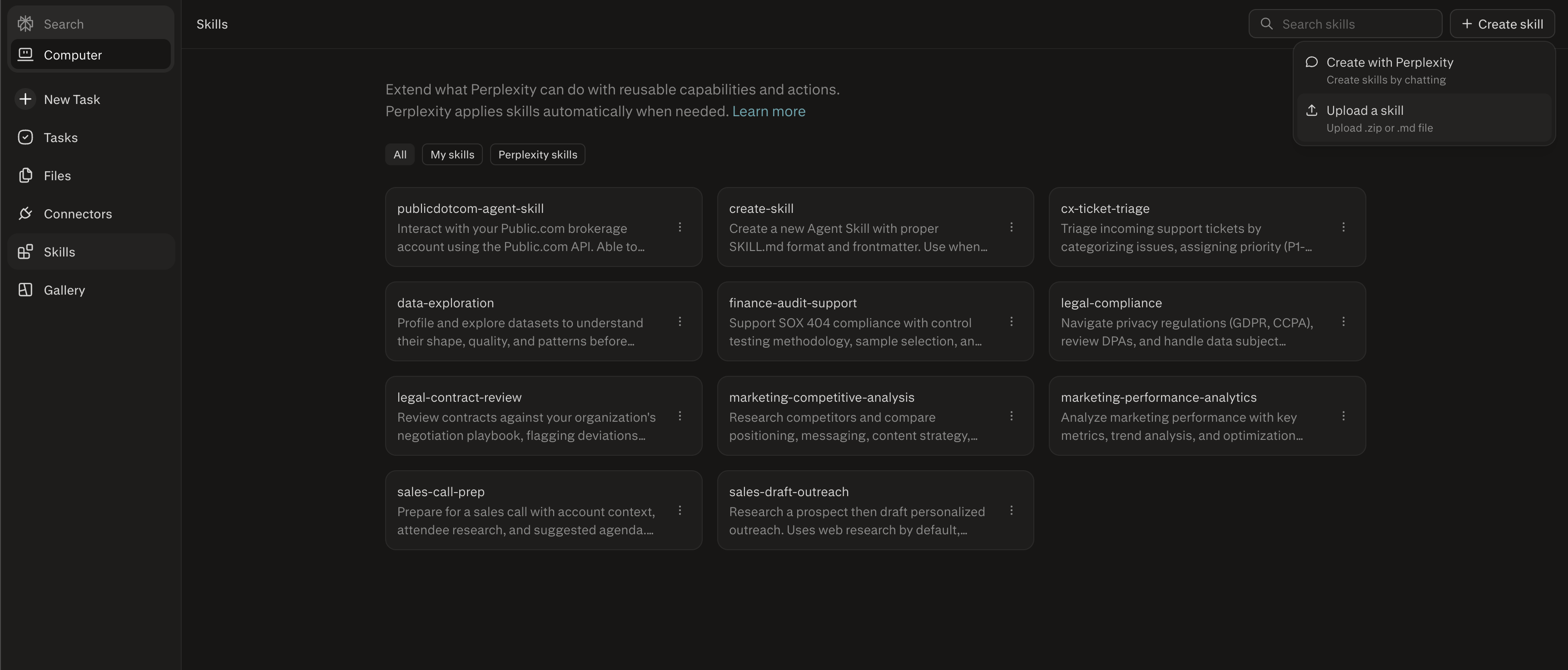
And that's it! It really is that simple to add the Public Agent Skill to Perplexity Computer. You're now ready to configure your API keys.
Configure your Public API keys in Perplexity Computer
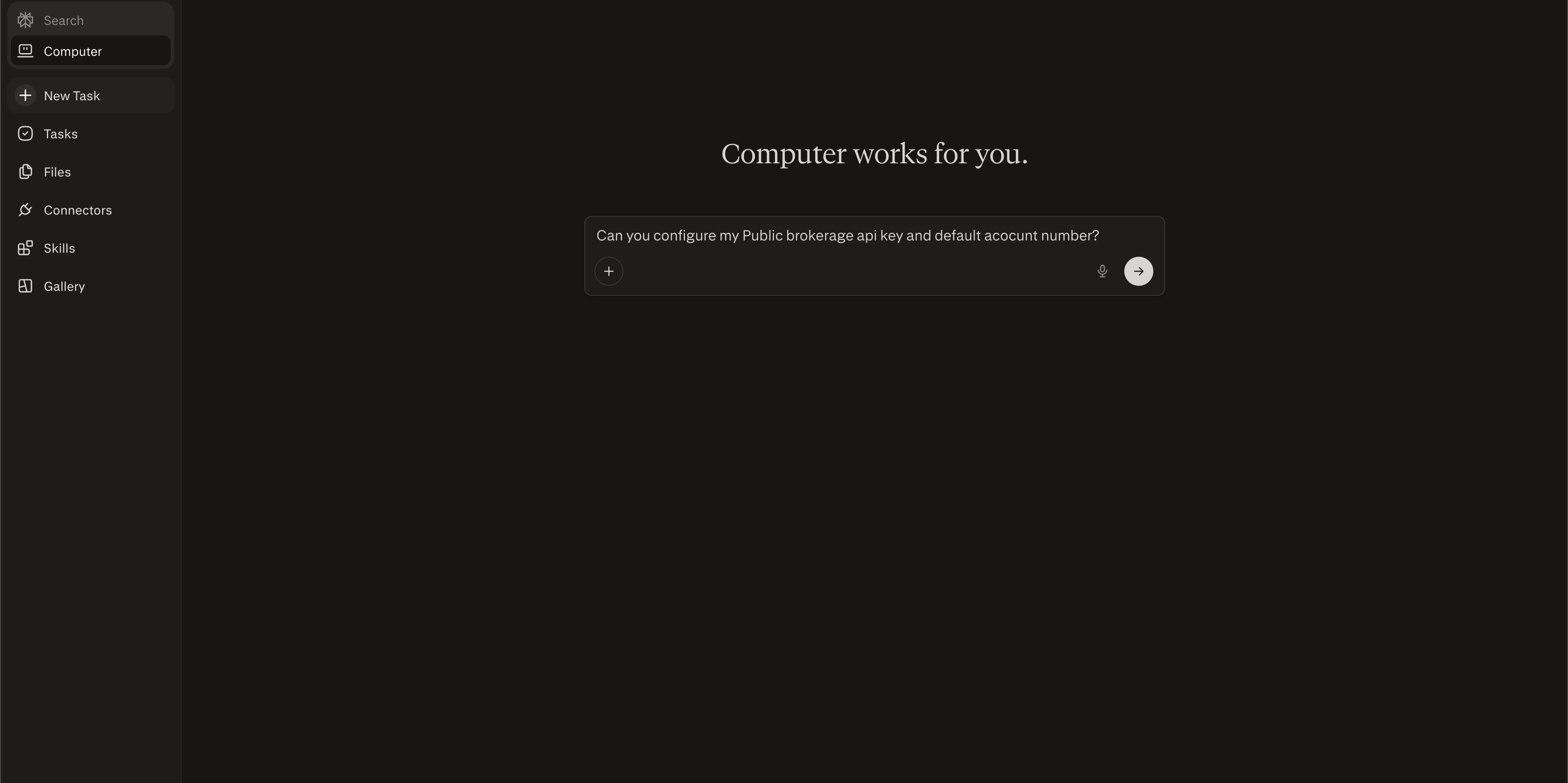
Configuring your Public API key is straightforward. Create a new computer task in Perplexity Computer and enter the following prompt:
Can you configure my Public brokerage api key and default account number?Security Notice
Pasting API keys into AI tools carries inherent risk. Your key grants access to your brokerage account and should be treated like a password. Only enter it into tools and platforms you trust. Never share it publicly or commit it to source control.
Perplexity Computer will prompt you to enter your API key and default account number. Once you provide them, your credentials will be saved and ready to use for all future tasks.
Retrieving portfolio data and placing your first option trade
With your API keys configured, start by asking Perplexity Computer to pull your portfolio. It will return your full equity breakdown, positions with P&L, cost basis, and available buying power:
How is my portfolio performing today?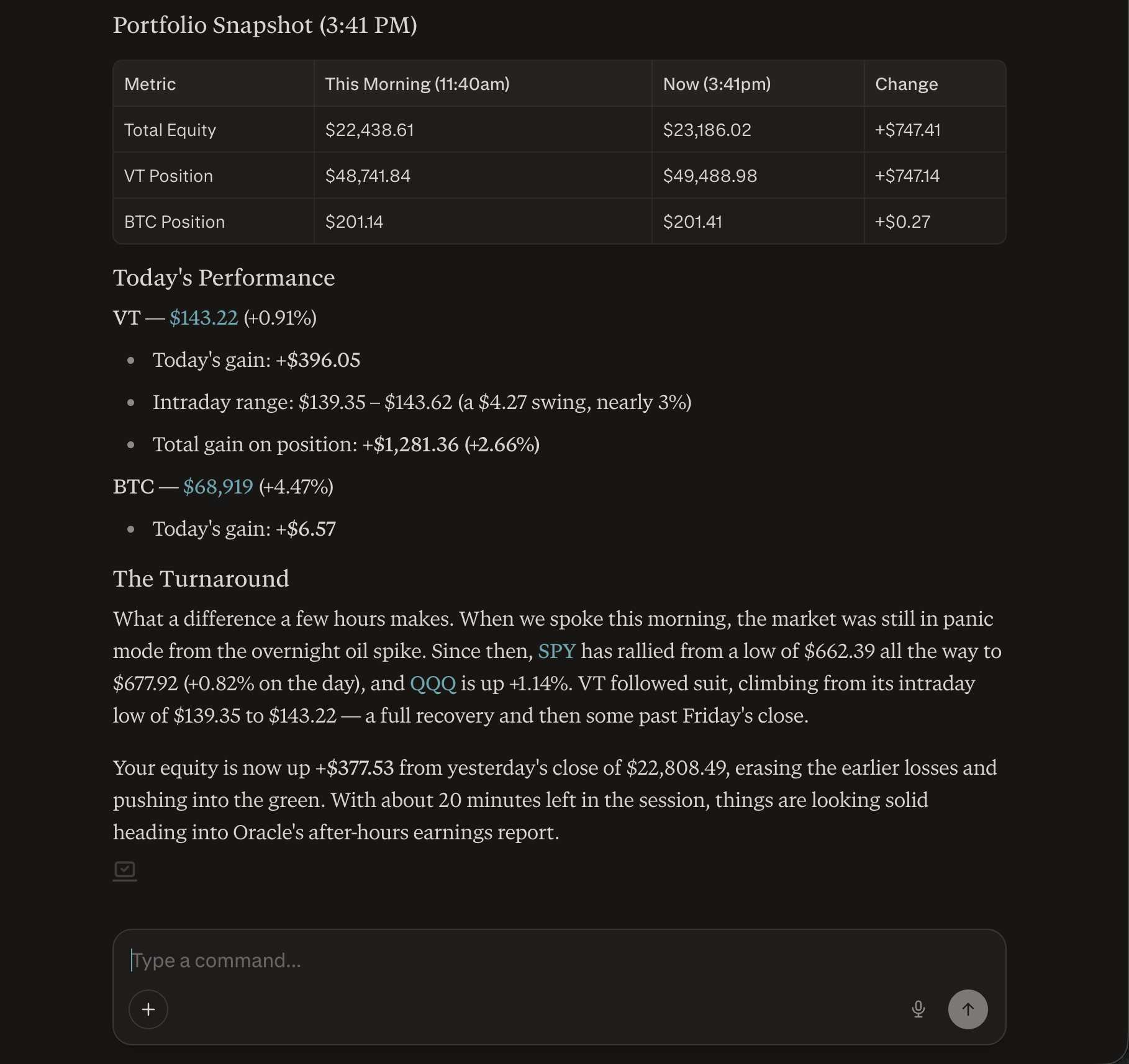
Next, research the option you want to trade. The skill can fetch live quotes, available expiration dates, the full option chain, and Greeks so Perplexity Computer has everything it needs to help you pick the right contract:
Show me the options chain for AAPL expiring next Friday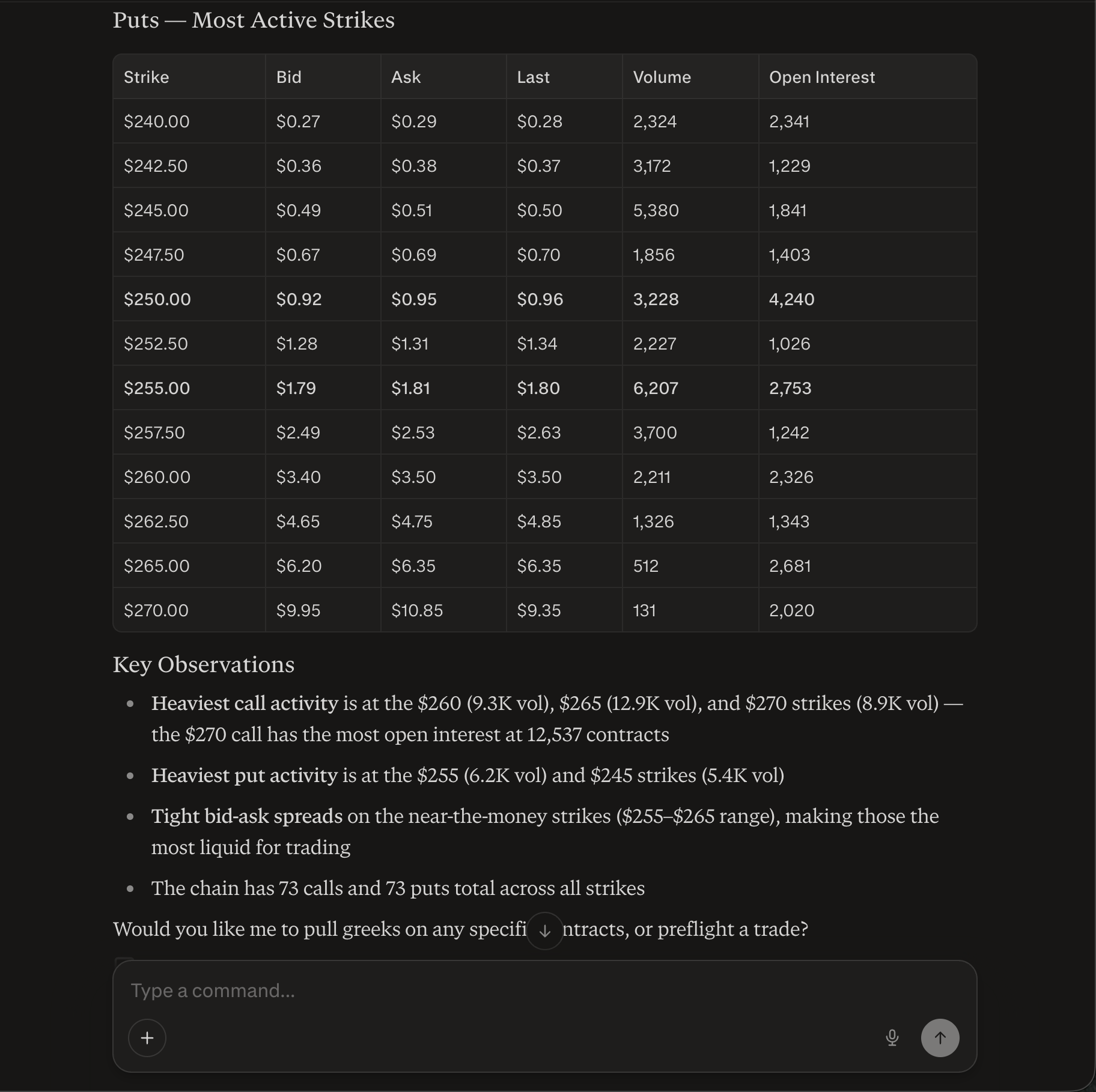
Once you've identified a contract, describe the trade you want to place. Perplexity Computer will automatically run a preflight check, estimating the total cost, buying power impact, and fees, before placing the live order:
Can you place a buy order for 1 AAPL call option expiring next Friday at the $200 strike?The skill supports equities, options, and crypto across all major order types (market, limit, stop, and stop-limit), including extended hours trading. You can also cancel open orders and review your full transaction history at any time.
The skill also supports multi-leg options strategies. Rather than placing each leg manually, you can describe the strategy in plain language and Perplexity Computer will handle the research, preflight checks, and execution for all legs together. Here's an example of placing a bull call spread:
Can you place a bull call spread on AAPL expiring next Friday? Buy the $200 call and sell the $210 call, 1 contract each.Perplexity Computer will fetch the option chain, run a multi-leg preflight check to estimate the net debit and buying power requirement, then place both legs simultaneously. You can use the same approach for iron condors, straddles, strangles, and other strategies supported by the built-in options automation library.
You're not limited to one-off chat interactions either. Perplexity Computer supports scheduled tasks, so you can set up cron jobs to automate recurring trading workflows without any manual input. For example:
Every weekday at 9:30am, check my portfolio and send me a summary of overnight moves
At 3:45pm daily, check if any of my options positions are expiring this week and alert me
Every Monday morning, scan the options chain for SPY and suggest a covered call strategy based on my current holdings
If AAPL drops more than 5% in a day, notify me and show the nearest put options for downside protection
More things you can ask
- Show me the current price of TSLA
- Show my recent transactions
- What are my open orders?
- Cancel my open AAPL order
- Find me a good iron condor strategy on SPY
- Set up a recurring check on my positions every morning
What's Next
You've connected your Public.com brokerage to Perplexity Computer and placed your first option trade, all through natural language. From here, you can explore more complex strategies using the built-in options automation library, which covers over 35 named strategies from simple single-leg trades to advanced multi-leg approaches like iron condors, straddles, and calendar spreads.
The real power comes from combining Perplexity Computer's research capabilities with your brokerage access. You can ask it to analyze earnings reports, scan for unusual options activity, monitor your positions around market events, and act on findings automatically, all without switching between tools.
For more examples and advanced usage, refer to the GitHub repository. The options automation library included in the skill is a great starting point for building more sophisticated workflows.